
Reporting on Line Item Properties and Note Attributes
What are Line Item Properties & Note Attributes
In Shopify, there are two particular fields that are contain a additional information relating to an order. These are:
-
Line Item Properties - namely, the additional information associated with the individual Line Item on an Order. Very often, merchants use third party apps to store additional variant options here E.g. Material: Wood
-
Note Attributes - namely, the custom information you typically have inserted as notes on the Order. These are divided into Name and Value E.g. I might have an order with Name: Delivery Date and Value: 06/06/2022
Lots of 3rd party apps use these fields to add additional information to an item/order.
By themselves they're not especially useful, but we can take the info stored in these fields and include it in Reports. Let's look at how.
Setting up Line Item Properties/Note attributes
These fields can be added to many reports as separate columns inside Report Toaster using our Calculated Fields feature. Custom fields like this are setup on the backend by our Report Toaster staff.
Calculated Fields are available on all Paid Plans of Report Toaster. You can login and subscribe here at any time - https://reporttoaster.cloudlab.com/subscribe
To set this up, all you need to do is to contact us at [email protected] and send us a screenshot of the fields you want to add.
The easiest way to do this is to follow this process:
-
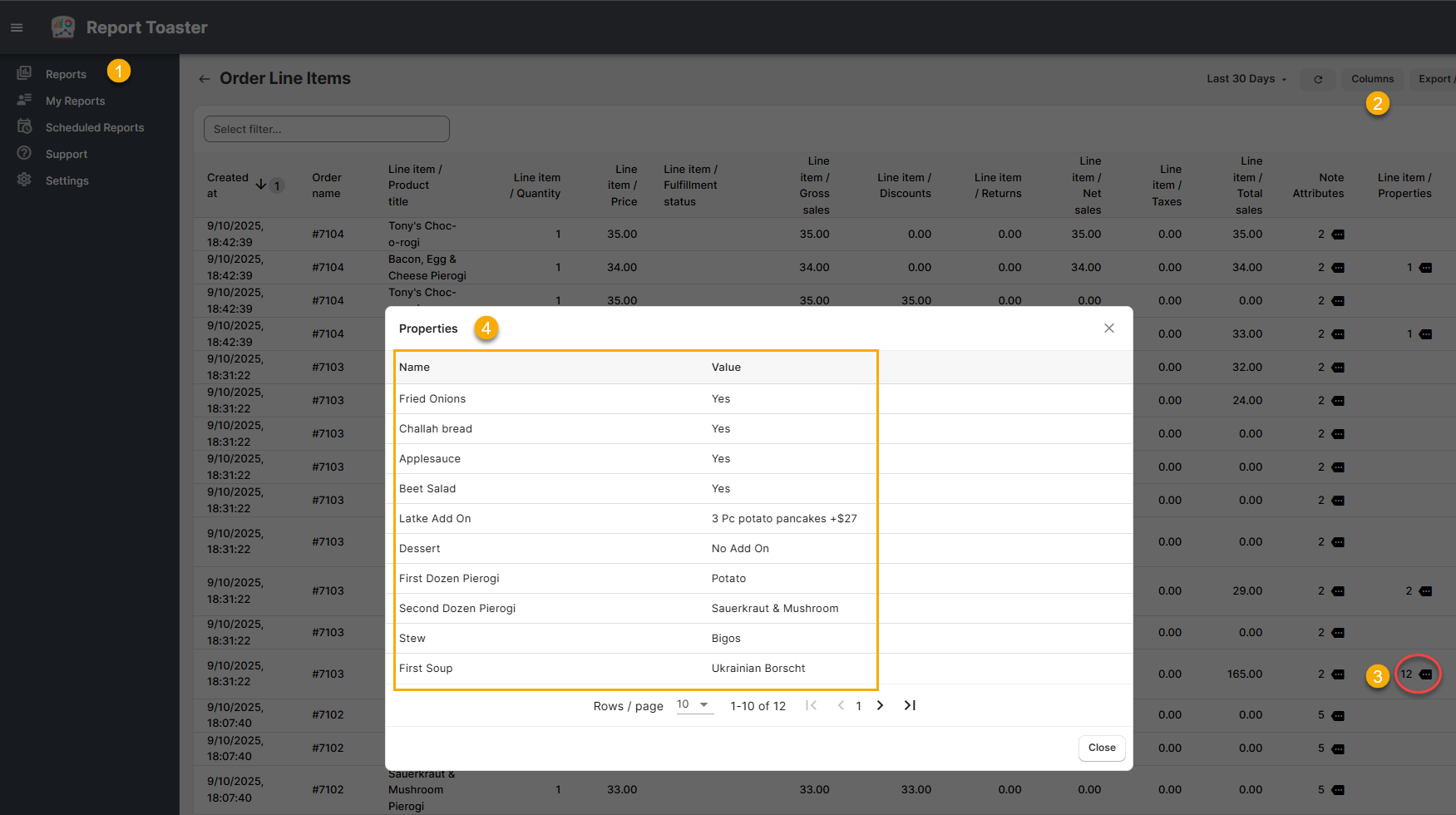
Go to Report Toaster, click on Orders, then go to the Order Line Items report
-
Click the columns button (top right) and add the Line item / Properties (or Note Attributes) column to the report.
-
Click on the dropdown for Line Item / Properties (or Note Attributes)
-
Tell us which of the resulting fields you'd like us to create as separate columns. (you can always send us a screenshot like the below).
(click image to enlarge)
Where Next?
We've set up Line Item Properties and Note Attribute columns for several of our merchants already!
If you'd like us to set these up for your store, please contact us at [email protected] and we'll be happy to take care of it.
All you need is a paid subscription, let us know which fields you want to add (full page screenshots and a note of which you want added as separate columns are VERY helpful), and we'll take care of the rest!